
 The easiest way to move a track “back” in a mix is to lower its volume. This works because in our everyday lives, sounds get quieter as they recede from us, so we’re accustomed to the effect.
But our brains also use other cues to determine distance. For example, human hearing excels at matching a sound with the echoes and reflections it causes, to localize its source. And we can apply this principle to add realism when creating the sound stage in a mix.
The Speed of Sound
Consider this picture, and the accompanying audio samples below.
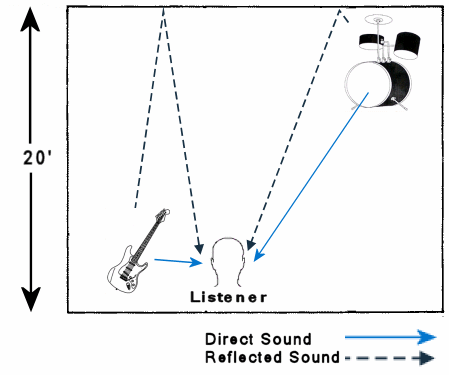
In the scenario illustrated above, sound from the guitar reaches the listener almost immediately, whereas the reflections off the rear wall make a 40-foot round trip, and therefore arrive 40ms later. (Sound travels approximately 1 foot per millisecond.) With the drum kit, on the other hand, the direct and reflected sounds arrive at almost the same time.
The series of events goes something like this:
| Time | Event |
|---|---|
| 0ms – | Guitar and drum both play |
| 5ms – | Guitar sound arrives at listener |
| 20ms – | Drum sound arrives at listener |
| 25ms – | Drum sound reflected off rear wall arrives at listener |
| 40ms – | Guitar sound reflected off rear wall arrives at listener |
Our ears and brain are sensitive to these differences in sound arrival time, and use the information (along with other cues, like volume) to judge where a sound source is located in the space around us. Our brains know that sounds and reflections arriving together at our ears must have originated close to a wall, where sounds that arrive much before their reflections must be close to our ears.
Hear it in practice
Here are two short instrumental samples, both mixed from the same raw tracks, to illustrate how this can apply in a mix.
In the first sample, I’ve placed the drums closer by adding a delay between the direct drum sound and the reverb, so the reflections arrive 40ms later than the direct sound – which tricks our ears into hearing a 20ft distance between the drums and rear wall, as with the guitar in the above diagram:
In the second sample, I’ve simulated moving the drums further back by having the direct sound and reverb occur together, both 40ms later than the guitar.
Note that the levels are the same in each clip. I changed the delay times only, to illustrate the effect.
Issues
Caveat: The illustration above is grossly over-simplified. Sounds in a real room reflect off all the walls and surfaces, not just the rear wall. And our ears depend on much more than just timing differences to determine distance. But for the technique at hand, those complications generally aren’t important. The idea here is to trick listeners’ brains by exploiting a property of their sense of hearing, and whether there’s one wall or 4, human ears and brains interpret reverberant sounds the same. (If your listeners are mostly non-human, then all bets are off.)
Implementation: In Sonar, I configure sends (i.e. busses) with delay plugins for each delay time that I need, and I route tracks accordingly. But any platform that allows bussing or routing the signal can accomplish the same end result. So long as you can independently control the delay on the direct sound and on the reverb, you can manipulate the relationship between the two as described above.
Other levels: In practice, you’ll also reduce the level of the drum kit somewhat to make it sound more distant, and adjust the reverb level as required to make the effect more obvious.
Pre-delay
As an addendum: Most reverb units and plugins have a pre-delay setting for controlling the delay between the input sound and the reflections it generates. Pre-delay serves exactly the same function as placing a delay between the direct sound and the reverb. In essence, it “moves” the sound further from the simulated reflecting surface. So if your reverb unit or plugin supports pre-delay, you can accomplish much of the above technique without a separate delay plugin.
And remember this simple guideline when using reverbs for realistic 3d sound stages: To bring a sound forward in the mix, increase the pre-delay.
See Also: Reverb on kick drum, Reverb possibilities
For more home recording tips,
Subscribe to the Hometracked feed, or receive email updates.
Tags: delay, hearing, psychoacoustics, reverb
23 comments
Trackback URI Comments feed for this article
In all honesty, what I find more interesting than the volume/space shift in the second sample (Which, in all honesty, I probably wouldn’t even have noticed had I not been told to look for it in the article) is the way the timbre of the drums (Particularly the snare) themselves changed when you simulated moving them back. It makes sense that this would happen, of course, but I found it fascinating nonetheless.
I’ve seen those functions before. I only toyed around until I get the sound I thought was nice. Yeah I know, I am still an amateur. :)
I will try this approach for my next ‘demo’. Thanks Des.
I used this on a mix and after playing it for a few people their number one comment was, “wow, those drums feel like they are really far back”. One comment was, “I actually feel the drums more than I hear them”. It is amazing what a few milliseconds can do to a mix…
why is this blog only posted on less than monthly?
> why is this blog only posted on less than monthly?
Other commitments, I’m afraid :(
(Though some are music-related …)
that’s cool, is there only one writer for this blog? if so, is he/she opposed to letting somebody contribute occasionally?
One more really cool thing to try is a Haas delay. Basically the same idea, a 20 – 40ms delay which corresponds to a secondary reflection… only you put the source in one ear, and the Haas delay in the other ear. The Haas Effect is that, even though the sound goes in both ears at different times, there is no perceptual shift of the source location… but perceived loudness of source increases. In essence what first ear hears gets fused with what the second ear hears, and it adds up. Haas delays have the added benefit of adding a sense of clarity and depth to the mix. (don’t do it on the whole mix… do it on the one thing in the mix that could use some pizazz)
There is a neat discussion of Haas Effect in Bob Katz’ “Mastering Audio”.
Your comment on Haas effect is a bit off. If you delay the left channel by about a millisecond or less, the sound will appear to come from the right side, even though both channels are at the same volume. This comes from the fact that sound travels about 1 foot/millisecond, so sound coming from your right side will hit your right ear a little less than a millisecond before it hits the left ear, and up to a millisecond for people with really fat heads. Of course this is combined with reflections and filtering. Also this really only has the desired effect if listening on headphones. If done wrong, it can have sort of a head turning effect on loudspeakers, so you need to be a bit careful.
Love the write up. BTW. Another obvious and simple way to re-create a 3D space in a mix is to record an instrument in your recording studio with a distant microphone. Thus you simplify the process without the need for artificial reverbs. This works great for percussion, vocal effects, even electric guitars. Also try experimenting with stereo miking techniques like M/S.
imo, A neat way to save on processing whilst mixing.
Peace
Josef Horhay
http://www.acoosticzoo.com – recording studios brisbane.
Yes, I agree with Josef, I often use either a co-incident pair or a blimhein pair of good room mics in a decent room, to capture a natural movement of stereo image.
If you are lucky enough to have a binaural mic set, this would be even better!!
Great write up by the way!
Joel
Univibe Audio – Recording Studio Birmingham
is there any software out there that simplifies the process?
Great blog! Very informative, I have been looking for information on 3d sound placement for a while. I think this might actually help me, wish me luck :P
my brain hurts, lol
Another good post, unfortunately the blog is broke.
Thank for taking out the time to conduct this experiment. It helps me figure out why delay sounds different when it comes to 3d sound.
Pre-delay is one of those things that most people don’t bother thinking about, and just leave whatever the preset value is.
It’s a shame because if you set them carefully right across your mix, the small differences all add up!
Amazing 3D Sound Placement blog! Very informative
Great article !! So would using multiple delays further enhance the localisation of the source ?? Interesting implications, this will keep busy for a while !! Thank you so much :)
* Keep me busy
This is an excellent explantation of predelay and how it can affect the space of a mix. Going to implement this alot more often in my mixes