
 Vocal recording and effects chains include, depending on the performance, a de-esser, a noise gate, an equalizer, and a compressor. Frequently, engineers also add effects like chorus, delay, tape saturation (unless recording to tape, of course,) and reverb, to enhance the sound.
In a pro studio, most of this treatment is handled by expensive hardware and plugins (like those from Waves and UAD.) But you don’t have to break the bank to polish up your vocal tracks thanks to the many libraries of free plugins found on the Internet, most available for any DAW that supports the VST standard.
I’ve compiled a list of the best plugins for a killer free vocal chain, along with a sample of the plugins at work on one of my vocal tracks.
The Plugins
De-esser: Spitfish [Windows and Mac]
Noise gate: Floorfish [Windows and Mac]
EQ: Nyquist EQ [Windows and Mac]
Also consider Kjaerhus Classic EQ [Windows only] and Paris EQ [Windows only]
Compressor: Kjaerhus Classic Compressor [Windows only]
Also consider MJCompressor [Windows and Mac] and blockfish [Windows and Mac]
Reverb: DX Reverb Lite [Windows and Mac]
Also consider Glaceverb [Windows only], Ambience [Windows and Mac], and Kjaerhus Classic [Windows only]
Tape Saturation: JS Magneto [Windows only]
Also consider Saturator [Windows only] and Voxengo tube amp [Windows only]
Although I haven’t included them the example below, the following plugins are also suitable for a vocal effects chain:
Chorus: Kjaerhus Classic Compressor [Windows only]
Delay: Bionic Delay [Windows only] and Kjaerhus Classic [Windows only]
Limiter: W1 [Windows and Mac]
Building The Chain
A vocal performance starts in the singer’s diaphragm, travels through her throat and mouth, to the air, the microphone, then the speakers, and finally the listener’s ears. In general, I like my signal chain to reflect this path, by placing each effect in the same order as the physical property it adjusts. So:
- A de-esser modifies the effect of the singer’s tongue and teeth.
- A noise gate is analogous to the singer’s lips, opening and closing.
- Equalizers and compressors, in some ways, address the result of microphone selection and placement.
- Finally, reverb and delay simulate the space in which the vocal is heard, analogous to the listener’s ears at the end of the chain.
These are just guidelines, of course. You can combine effects in any order to achieve a specific sound. (For example, put reverb before the compressor for a pumping reverb effect.) However, this “vocal path” approach is a good starting point for most vocal effects chains, especially if your goal is simply a polished track.
Hear it in action
I’ll illustrate the effectiveness of these free plugins with the vocal from On My Feet Again. Here’s a short section from the original, raw track, recorded with an SM58 directly into my mixing board:
There are some obvious issues with this recording:- It’s dull: I chose the SM58 for this song because I like the way it saturates my “loud” voice. But that pleasant dynamic saturation comes at a price: Reduced clarity in the high frequencies.
- The dynamics are uneven: Notice how much the second “still” jumps out. Ideally, I should have re-recorded for a more even performance. But I liked the energy in this take, and since I knew I’d be compressing the track anyway, I decided to keep it.
- There’s sibilance: I could have eased up on those S’s a little.
- It’s dry: This is by design, as I wanted to keep my room sound out of the recording. However, a track this dry often sounds unnatural or harsh when mixed with other instruments, especially when those instruments (like the drum kit in On My Feet Again) have an open, ambient sound.
To address these issues, I choose a straightforward approach:
De-ess -> Gate -> EQ -> Compression -> Tape saturation -> Reverb
Of course, this chain isn’t suitable for treating all vocal tracks. But each effect here is appropriate, given the issues identified above.
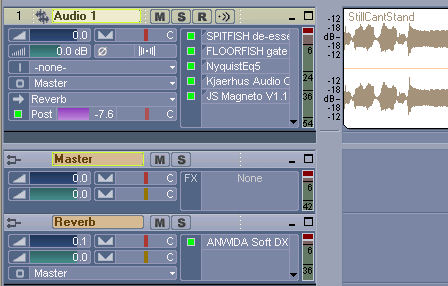
The de-esser (Spitfish) is tuned to roughly 7Khz, at a medium depth, just enough to soften the worst of the sibilants.
In the quieter parts of this song, the noise gate action is pronounced, gating out my breathing. But in this sample, it doesn’t have much work to do. My inhalation sounds add urgency here, and I didn’t want to cut them out completely.
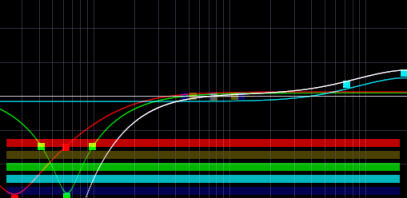
I used the equalizer primarily to address the dullness I mentioned. The main causes of the dark sound are the SM58’s frequency response, and the proximity effect – I sang with the mic almost touching my lips. So I rolled off the low frequencies, everything below roughly 130Hz, and gently boosted the top-end, above 3Khz:
To address the uneven dynamics, I started with the Classic Compressor’s vocal preset, set the threshold appropriately, and boosted the ratio just past 5:1. That’s fairly aggressive compression for a vocal track, but I think the “squashed” sound really suits the song.

Finally, the reverb. I placed this plugin on a bus (or “effect send” in some DAWs,) instead of directly on the vocal track, mostly out of habit. I find it more convenient to adjust the reverb level without having to open the plugin interface. Also, while it’s not relevant in this case, I often use the same reverb effect on several tracks (for example, vocals and acoustic guitar) to place the tracks in the same “space,” and using a bus lets me do this with only a single instance of the plugin.
So putting it all together, here’s the processed sample:
A vast improvement, and it didn’t cost me a penny! (And you can hear the final vocal in context here.)The plugins I used to build the free vocal chain are my personal favorites, but we all work differently so they might not suit your style. (The Nyquist EQ, in particular, is less-than-intuitive if you’re used to traditional parametric equalizers.) Fortunately, there are hundreds of free plugins offered on the Internet. If you’d like to tweak this chain for your own uses, check out Audio Mastermind’s list of free VST plugins.
For more articles on recording vocals, and home recording in general,
Subscribe to the Hometracked feed.
46 comments
Trackback URI Comments feed for this article
Great man, I´d really learned a lot from this!!
Stefan
really great article ! thanks a lot, i was been lookin for something like this for a long time ! im a home singer \m/
please help me i have a horrid hiss when i record i let the mic run on record just to see if i could get rid of them and i have the slightest idea of how to go about getting rid of it i have a cheap shure condenser mic recording into an adobe setup i dont know if i am suppose to fix it post record or pre record and how.
by the sounds of it you need a denoiser, all it is is just the general noise created from the equipment. i had this problem on cubase and found that there is a denoiser vst already in it.
in very basic terms it creates almost like a floor where anything underneath will be dropped however many decibels to make it unaudiable.
Some others amazing free plugins:
EQ: BootEQ mkII, NastyHF/LF and NastyCS
Comp: Density mkII (this is da bomb)
Tape sm: FerricTDS (first place in KVR Developer Chalange 2009)
Reverb: Epicverb
@ Variety Of Sound developers fan.
http://varietyofsound.wordpress.com
Oh my!!!! Des, your voice is soooo beautiful!! really…. and anyway, thanks for sharing the plug in…
Nice voice ;)
You can try the already mentioned Bootsy plugins.
The FerricTDS is a killer to compress vocals (and everything else :D ).
I add my favorite free EQ :
http://www.aixcoustic.com/index.php/Electri-Q-posihfopit/30/0/
You can do a lot more than most plugs with it, because you can choose the type of EQ with a menu ;)
i downloaded the vocal chain effects and placed them in my vst plugins folder, but when i try to use them in an insert they do not show up in my effects list. can anyone help me with this?
What kind of reverb settings did you use?
Great post once again! I am looking forward for more updates!
Really nice advices. Thanks.
Thanks man! This plugin chain sounds great! But for me it sounds better when I first limit the sound with the TWest Limiter and use the TWest vocal compressor with the vocal1 preset. As delay I used the samplitude 11 silver delay with a minimal touch of a vocal doubler effect. The warmth did the samplitude tube amp. For rap I think the vocals need many dynamic. You can hear the sound on my website. The mentioned song is “Identität”. The vocal effects from TWest are freeware. They sound very great! You find them on http://www.terrywest.nl
Thank you for the wonderful plug ins.
I’m impressed by your writing. Are you a preofssnioal or just very knowledgeable?
waves noise eliminator ! Tube Screamer compressor !, M40 re-verb, or to make a long process short, just get NECTAR its does everything .
I wouldn’t waste my money on Waves products. I’ve tried all their plugins, and while some may be okay, most are only good for Dr Who alien sound effects. Because Waves plugin bundles cost between $500 to $6000 people assume they must be the dog’s bollocks, I did, but when I managed to try them I was truly appalled at the quality of most of the components, an outright rip-off for the price. I read somewhere on a forum that they also charge about £30 to raise a customer service query! Be warned and only buy their stuff after you’ve given them a thorough trial.
One plugin from the Waves bundles that did catch my attention though is ‘CLA Vocals’, an all in one VST that has adjustments for bass gain & bass colour, treble gain & treble colour, compression & compression colour, a very nice reverb & reverb colour, a delay and delay colour, and pitch modulation and pitch modulation colour. This really did manage to liven dull vocals. (http://www.waves.com/content.aspx?id=10516)
I have dowloaded the Nyquist EQ into my host and since I’m a little new to the game I’m having some trouble understanding the controls on this plugin. Can you refer me to any instructions to the controls I am familiar with Para Eq this one just has me stumped…..thanks.
Thank you much for this informative write-up. You have helped me out a lot here. THANKS!
More Comments: ‹ Previous · 1 · 2