
 To play sound our ears and brain understand, a digital audio system must emit an analog signal. The switch from digital to analog is handled by the digital-to-analog converter, usually just called a DAC.
Under specific conditions, which I describe below, the DAC can produce an analog signal that momentarily exceeds the level of the digital signal from which it was converted. This is known as an inter-sample peak, and while it may at first seem just a curious side effect of the conversion process, these peaks have implications for anyone working with digital audio. And in particular, engineers who like “hot” mixes.
Digital Audio – grossly over-simplified
Computers process numbers, so to work with audio in a computer, we must convert the sound into numbers. This is accomplished by “sampling” the audio signal at regular intervals – 44,100 times a second for CD audio – and saving the observed level. The diagram below illustrates this, albeit crudely. The samples in red, numbered 1 to 9, represent a sequence of signal levels observed by the recording interface.
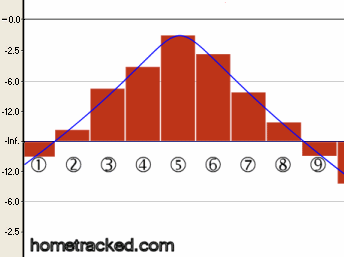
You can see something similar by zooming-in on a waveform in any recording software. The “step-ladder” model illustrates the discrete samples of digital audio, with levels ranging from “-inf” (silence) to 0 dBFS (the loudest sound a digital system can represent [*]) However, sound outside a computer doesn’t move through the air in jagged, abrupt steps. Rather, it moves smoothly and continuously – more like the blue line in this diagram.
Digital to analog conversion, then, is essentially the creation of the smooth blue analog line from the set of stepped red digital samples.
Intersample peaks
Occasionally, the smoothing yields an interesting result, illustrated below. Note that in order to generate a smooth curve between samples 5 and 6, the DAC produces a signal that peaks higher than either of the samples. This is an inter-sample peak.
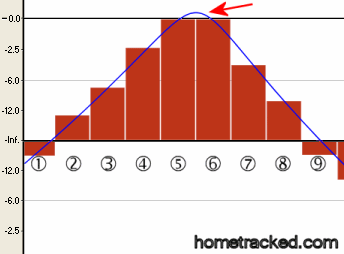
This diagram also illustrates the main issue with these peaks: Samples 5 and 6 are both at 0 dBFS – that is, they represent the loudest sound the digital system can reproduce. Yet the peak analog signal reconstructed by the DAC exceeds this level.
In short, the DAC in this example has generated an invalid signal.
How does it sound?
What this means in practice depends on a few factors, including the quality of the DAC, and the signal chain after the converter.
In the worst case, the example above would result in audible clipping when the system tries to generate the illegal voltage. But even if no clipping occurs, the analog side of the DAC will only handle the signal cleanly if the DAC’s analog circuitry has some headroom. If the DAC’s designers assumed that 0dBFS is the loudest signal the converter will emit (technically, a valid assumption,) then an analog peak above this level will cause distortion.
Here’s a short clip I deliberately mixed hot. There’s no digital clipping (the maximum sample level is -0.1dBFS,) but there are lots of inter-sample “errors”, including a nasty string of them at 0:13.
If you hear any pops or clicks, it’s a good sign that your setup doesn’t allow for inter-sample clipping. Most likely, though, the track sounds just fine to you. Many systems, especially those equipped for mixing audio, allow some head room between the maximum digital signal level and the onset of analog distortion.
But not every system… If you mix hot, especially if your meters peak within 1dB of full scale, your mixes probably contain these peaks. And though your DAC protects you, there’s no guarantee that your listeners have quality converters. In other words, you may be sharing clipped or distorted audio without realizing it!
Preventing inter-sample clipping
There are at least 3 ways to ensure your mixes don’t generate inter-sample distortion:
1. Leave lots of headroom in your mix: This is the obvious solution, and it requires no special processing. As long as you keep the peak levels in your mix below 0dBFS, the DAC will never encounter the situation described above. The consensus I’ve found is that real-world inter sample peaks never exceed 1dB, so keep your levels below -1.0 dBFS and you’ll be fine.
2. Use a mastering tool designed to prevent these peaks: iZotope’s Ozone is one such tool. The loudness maximizer has a one-click option to prevent inter-sample clipping.
3. Use a metering tool that highlights the peaks: SSL recently released the X-ISM Plug-In which adds an inter-sample peak meter to any VST-capable DAW.
X-ISM uses significant processing to provide a combination of up-sampling and filtering that mimics the operation of an oversampling DAC’s reconstruction process. The result is a meter that shows inter-sample errors and provides a useful tool that most DAW metering misses.
More reading
Along with the page on SSL’s site, above, here are a few more links that explore the issue in detail:
– Chris Tham’s Issues with 0dBFS+ Levels On Digital Audio Playback Systems
– This classic thread on ProSoundWeb (especially the posts by Paul Frindle) presents head-spinning amounts of information. I recommend re-reading it every few months.
For more home recording tips,
Subscribe to the Hometracked feed, or receive email updates.
Tags: mixing
22 comments
Trackback URI Comments feed for this article
Hmmm.. seriously new stuff to me.
I normally just look at those little meter’s. If it goes above red then I reduce the main volume. :D
Good article. I fell victim to them. I lower the levels and they disappeared but never knew why when I never saw clipping on my meters.
Thanks for this, so often I hear digital anomalies. but there are so few explanations as to where they are coming from. I am having a hard time believing they could be as much as 1.0 dB, though. That is a very large interpolation for any DAC to make.
> If it goes above red then I reduce the main volume.
A sound practice :-)
> I am having a hard time believing they could be as much as 1.0 dB, though.
The Neilsen/Lund paper that lays out the theory for this shows a contrived example where the inter sample peaks are 6dB (!!!) higher than the sampled level.
They go on to say that many mastering engineers agree 3dB is a safe, conservative allowance. (And 1dB, like I said above, is the general consensus on the web, and among my engineer friends.)
Here’s the paper, if you want more details:
http://www.tcelectronic.com/media/Level_paper_AES109.pdf
Heres a (late) question: if the target format is MP3, does explicitly avoiding inter-sample overs help? The reason I ask is because it was my impression that the mp3 decoding process changes the waveform, introducing new inter-sample overs. Infact the mp3 example you posted, once decoded to wav, actually has regular overs, which have been induced by the decoding process.
Surely keeping the track out of the red is good advice regardless, but I wonder if having zero inter-sample overs in your mixed down WAV means that an mp3 encoding of that WAV will also be free of them?
intersample peaks are a meaningless red herring !!!
if your analog amplifier has headroom then you get a great result no matter what the blather on the various bbs etc. try to tell you. and most of those idiots never had a real sampled digital system course in a real grad school.
if your analog out cant handle the signal then even peak digital may cause problems — it really depends on how hot you normalised the digital signal.
you can always eliminate the alleged problem by lowering the digital volume level and turning the output amp knob to the right. no distortion , still loud enough to make your ears bleed.
this should all have been handled by teh people designing the a/d/a chain. so you dont need to worry.
now if you have two different a/d and d/a boxes then they may not match. so just turn the digital level down and be safe.
Mr. Sixpack is correct.
We are talking two different domains.
If you sampled at greater than twice the highest frequency
then you *could* recreate the original signal exactly.
And that is what is happening!!
You get the ANALOG peaks higher than the digital because they were higher originally.
There is no guarantee that your samples will all be at the highest analog peaks. In general most samples will be well below the peak, with an occasional sample perhaps being close to the highest analog value. The higher the sampling rate the more samples that will be near the peaks though. And the less this impact (alleged) “problem” will have.
Now , to be fair, in practice you need at least 10x as many samples as nyquist said was mathematically sufficient. This is a practical engineering limitation.
As is the analog domain after D/A. A good design will allow for those peaks because they are a normal phenomenon. If there is not enough headroom then back off the gain on the digital signal so you do get a clean analog output. Then turn your amp knob to the right and make it as loud as you want.
It has been said before by guys like Bob Katz and Mr. Ludwig but the best way to avoid these problems is ……… AVOID THE LOUDNESS WARS !!!
All these CDs these days that are squashed to a constant square wave maxxed out to a constant 0.00 sound LOUD, but they sound BAD.
Look at your mastered WAV files …….. if they look like a big rectangular box and the meters don’t move more than 0.5 db during the whole song, then you are overcompressing and limiting the life out of your music.
Let the music keep some dynamics and BREATHE some up and down …..
Real music needs to have some dynamics of AT LEAST 3-6 db.
Yes, that means you may have to turn the volume knob on your stereo up a notch to be as loud as some commercial releases — but at least it will sound good and not sound like a clicky, poppy. wall of constant noise
Very informative – and a bit confusing after reading some of the comments.
I don’t know how modern DAC’s work in practice, but I have certainly heard
recordings with way too many overs to be listenable.
An acoustical engineer-friend of mine had a rather sophisticated hifi preamp
once, which blinked an led every time clipping occurred on the digital input.
Listening to the debut album by The Darkness, it was on a lot of the time.
Great songs, but horrible sounding recording because of the clipping…
Interesting read. I see where mike S is coming from and if you do compress everything and make your breakdowns compressed and normalised as well as the main part of the track it can sound too loud all of the time. And even though yes this kind of production will give rise to the probable chance of more inter sample peaks i still dont see why the producer should have to worry about them because its the designers of the DAC that should sort it out. Even if a track not involved in the ‘loudness war’ i.e. a classical recording was normalised that could still contain these clippings too, granted not as much of course but normalising a whole track to 0.db is a must at the end of a track at least just so when listening to lots of songs u dont have to fiddle with the output level every 2 minutes. Yes each song is percieved louder but at least if its normalised we have a bit more constance overall. Plus if the peaks on any given track where that noticeable to the audience listener am sure they would turn their system down anyway.
This is groundbreaking. I recorded an album on great gear, had it mastered. The whole process wasn’t ideal, but I was never happy with the final product. I always felt that there were parts in the songs that sounded “pop and click”-y….
It had to be these intersample peaks. Your example is just like my album. I continue to learn!
Thanks for your excellent explanation and Very informative post . I am little bit confusing after reading some of the comments.
I don’t know how modern DAC’s work in practice, but I have certainly heard
recordings with way too many overs to be listenable.
I am eagerly waiting for your respond.
If the “inter-sample” peak, as shown in your diagram (above), is really happening, then it is beyond the Nyquist limit frequency. In a properly designed converter, there is no such thing as an “inter-sample peak” inside of the audio bandwidth. Nyquist sees all peaks within the design band (typically around 21kHz in a 44.1kHz sample rate). If it weren’t so, you’ve just disproven Nyquist’s theory. Mr. GT.
By the way, there may be -other- design issues that cause problems with a hot signal really, really close to the maximum conversion headroom. But don’t confuse those “other issues” with “inter-sample clipping” within a Nyquist range.